Wednesday, 9 January 2019

Angular 6 Auth Guards / Route Guards - The Magic Autharization

What are Route Guards?


Angular’s route guards are interfaces which can tell the router whether or not it should allow navigation to a requested route. They make this decision by looking for a true or false return value from a class which implements the given guard interface.

There are five different types of guards and each of them is called in a particular sequence. The router’s behavior is modified differently depending on which guard is used.

The guards are:


  1. CanActivate
  2. CanActivateChild
  3. CanDeactivate
  4. CanLoad
  5. Resolve


Create a new service which implements the route guard. You can call it whatever you like, but something like auth-guard.service is generally sufficient.


iTechnoFreaks
  // src/app/auth/auth-guard.service.ts
import { Injectable } from '@angular/core';
import { Router, CanActivate } from '@angular/router';
import { AuthService } from './auth.service';
@Injectable()
export class AuthGuardService implements CanActivate {
  constructor(public auth: AuthService, public router: Router) {}
  canActivate(): boolean {
    if (!this.auth.isAuthenticated()) {
      this.router.navigate(['login']);
      return false;
    }
    return true;
  }
}

The service injects AuthService and Router and has a single method called canActivate. This method is necessary to properly implement the CanActivate interface.


The canActivate method returns a boolean indicating whether or not navigation to a route should be allowed. If the user isn’t authenticated, they are re-routed to some other place, in this case a route called /login.

Now the guard can be applied to any routes you wish to protect.


iTechnoFreaks
  // src/app/app.routes.ts
import { Routes, CanActivate } from '@angular/router';
import { ProfileComponent } from './profile/profile.component';
import { 
  AuthGuardService as AuthGuard 
} from './auth/auth-guard.service';
export const ROUTES: Routes = [
  { path: '', component: HomeComponent },
  { 
    path: 'profile',
    component: ProfileComponent,
    canActivate: [AuthGuard] 
  },
  { path: '**', redirectTo: '' }
];


The /profile route has an extra config value now: canActivate. The AuthGuard that was created above is passed to an array for canActivate which means it will be run any time someone tries to access the /profile route. If the user is authenticated, they get to the route. If not, they are redirected to the /login route.
Tuesday, 8 January 2019

Angular 6 Routing

When we run an Angular application and serve it on a port number say ( 4200 ), we get our application running at http://localhost:4200

This is the only path our browser understands, and hence it can’t serve different destinations on different paths such as http://localhost:4200/items. But, What if we have multiple paths in the same application ?

How to achieve custom URL paths

Javascript Router: It makes our lives easier by changing the destination whenever the path changes. In technical terms, by changing the application state whenever the browser URL changes and vice-versa.

These Routers are written in certain Javascript Frameworks and for Angular we have it packaged as @angular/router


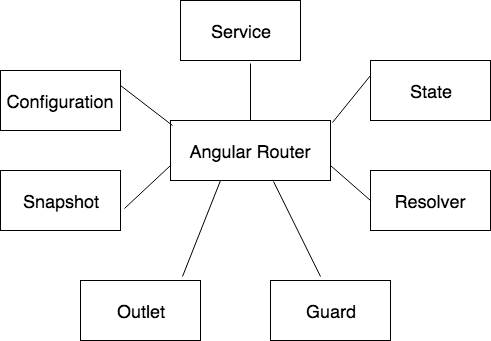
The @angular/router contains the shown terms:


  1. Service: This is a global service present inside the Angular Application.
  2. State: The state of Router is maintained by Router State.
  3. Configuration: It maintains information about all the routing states which is present inside the application.
  4. Guard: This is a code that runs whenever the router is activated, deactivated or loaded.
  5. Snapshot: It will provide access to state and data for a particular route node.
  6. Resolver: The script that will fetch data before the requested page is initiated.
  7. Outlet: This is the location in DOM for router outlet to place it’s components.

Now Let's Code:

To tell the paths and destinations to your browser, you need to import the RouterModule and Routes from @angular/router into your app.module.ts file.


iTechnoFreaks
> import {RouterModule, Routes} from '@angular/router';
After this, you can define an array of your paths and destination pages.


iTechnoFreaks
const routes: Routes = [
  {
    path: '',
    redirectTo: 'items',
    pathMatch: 'full'
  },
  {
    path: 'items',
    component: AppComponent
  }
];
Note: Here, the pathMatch is specifying a strict matching of path to reach the destination page.
Now, you need to pass the routes array in the RouterModule using RouterModule.forRoot(routes) and have to add it to imports


iTechnoFreaks
> RouterModule.forRoot(routes)
app.module.ts file will look like this:


iTechnoFreaks
import { BrowserModule } from '@angular/platform-browser';
import { NgModule } from '@angular/core';
import {RouterModule, Routes} from '@angular/router';
import { AppComponent } from './app.component';


const routes: Routes = [
  {
    path: '',
    redirectTo: 'items',
    pathMatch: 'full'
  },
  {
    path: 'items',
    component: AppComponent
  }
];

@NgModule({
  declarations: [
    AppComponent,
  ],
  imports: [
    BrowserModule,
    RouterModule.forRoot(routes)
  ],
  providers: [],
  bootstrap: [AppComponent]
})
export class AppModule { }

Wednesday, 2 January 2019

Introduction to Angular6: A beginner’s guide - Part 2

Introduction to Angular6: A beginner’s guide  - Part 1

How to Create a Component


Use ng generate to create a new component


iTechnoFreaks
> ng generate component hello-world


Let's look into our component class HelloWorldComponent

(basepath/src/app/hello-world)

Below is how the code looks


iTechnoFreaks
import { Component, OnInit } from '@angular/core';

@Component({
selector: 'app-hello-world',
templateUrl: './hello-world.component.html',
styleUrls: ['./hello-world.component.scss']
})
export class HelloWorldComponent implements OnInit {

constructor() { }

ngOnInit() {
}

}
Each component has a lifecycle of create, update and destroy. angular exposes hooks to interfare when these events occur in a component’s lifetime. these hooks can be implemented using corresponding lifecycle hook interface from angular core library.